
Record and analyze handwriting trajectories
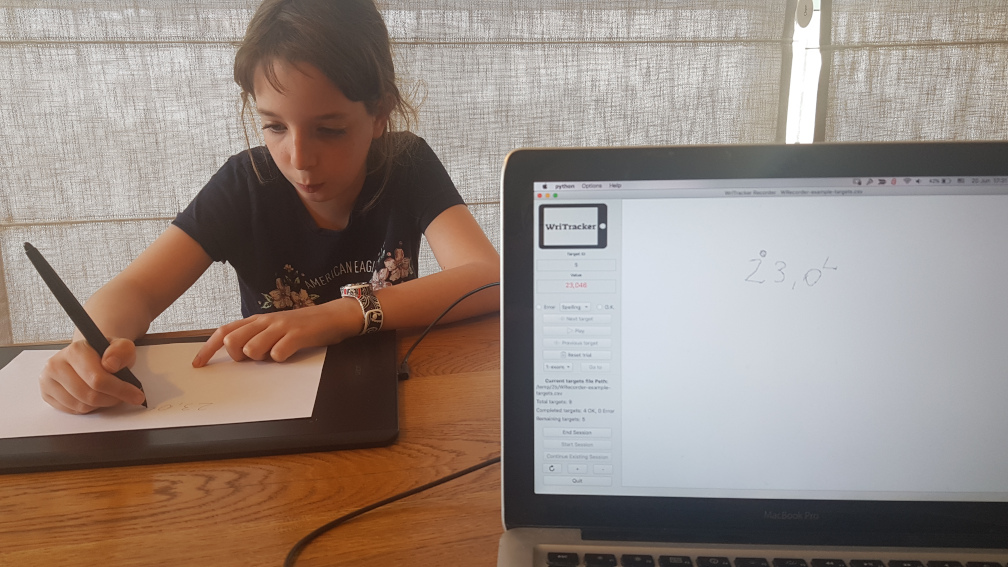
WriTracker is an application for recording people’s handwriting as they write words, numbers, etc. It lets you see what the participant wrote, mark errors, and obtain detailed information about the quality and timing of writing.
WriTracker makes it easy to examine what people wrote, but also how they wrote it: how fast they wrote, how hard they pressed the pen against the paper, the order in which they wrote the characters and the individual pen strokes, the distance between characters, and so on. You also get the full writing trajectories so you can analyze them in other ways.
WriTracker includes 4 applications:
- Recorder records the participant’s handwriting on a WACOM pen tablet. You can dictate the stimuli to the participant yourself, or play them from mp3 files. Recorder saves the full pen trajectories, including the pen pressure in each time point, in an easy-to-use format.
- Encoder lets you review the recorded handwriting, split each word/number into characters, and mark errors and self-corrections. Encoder creates a CSV file with all relevant information of each character, e.g., its position, size, and the inter-character delay and distance.
- The plotter apps visualize the encoded trajectories. PPlotter createds a PDF file with the full response to each trial. MPlotter creates a movie that shows the handwriting in real time.
Installation
Before downloading, check out the “system requirements” section below.
Download the latest WriTracker version here:
| Application | Windows | macOS (Apple Silicon) | macOS (Intel) |
|---|---|---|---|
| Recorder | WtRecoder-2.0-win.exe | Available only for windows | |
| Encoder | WtEncoder-2.0-win.exe | WtEncoder-2.0-macOS-Apple-Silicon.zip | WtEncoder-2.0-macOS-Intel.zip |
| PPlotter | WtPPlotter-2.0-win.exe | WtPPlotter-2.0-macOS-Apple-Silicon.zip | WtPPlotter-2.0-macOS-Intel.zip |
| MPlotter | WtMPlotter-2.0-win.exe | WtMPlotter-2.0-macOS-Apple-Silicon.zip | WtMPlotter-2.0-macOS-Intel.zip |
On windows, the downloaded EXE file is the application itself. Just save it on your computer and run it.
On mac, unzip the downloaded file and move the unzipped .app file to your /Applications directory.
WriTracker is also available via the project’s GitHub page (branch master). We will soon provide a downloadable installation on this web page.
If you find any bugs, please let us know at writracker@mathinklab.org.
System requirements
Recorder runs only on Windows. Encoder and Plotter can run on Windows and MacOS.
Before running Recorder, you will have to install the following:
- Download and install the driver for your WACOM tablet from the WACOM website (under the “support” section).
If you don’t know the tablet’s model number, you can find it on the back side of the tablet (here’s how). - Download and install the latest active version of Microsoft .NET (dot-net) runtime from the Microsoft .NET website.
Choose the latest stable version number (we last verified WriTracker with .NET version 7). In the next page, you will have to choose the specific version. Choose “.NET runtime” (not the SDK, not the “desktop runtime”, and not the “ASP.NET Core Runtime”; any of these will probably work too, but the installation will be unnecessarily larger).
You will also have to specify your specific Microsoft Windows version (x64, x32, ARM).
If you did not install Microsoft .net, you may get the following error when trying to run Recorder: RuntimeError: Failed to create a .NET runtime (coreclr)
Support
If you encounter problems, please e-mail us at writracker@mathinklab.org. Please include in your email:
- The application in which the problem occurred (Recorder, Encoder, PPlotter, MPlotter)
- The problem.
- The precise series of operations that cause the problem to appear.
- If relevant, attach screenshots.
We try to respond within a reasonable time, but WriTracker is a side hobby, not our main job, so please be patient…
Developers
WriTracker is written in Python. The source code is available in the project’s GitHub page.
If you want to contribute, e-mail us at writracker@mathinklab.org.
Copyright / Credits
WriTracker is protected under the GNU General Public Lincese, version 3.
WriTracker is free software: you can redistribute it and/or modify it under the terms of the GNU General Public License as published by the Free Software Foundation, either version 3 of the License, or (at your option) any later version.
WriTracker is distributed in the hope that it will be useful, but WITHOUT ANY WARRANTY; without even the implied warranty of MERCHANTABILITY or FITNESS FOR A PARTICULAR PURPOSE. See the GNU General Public License for more details.
Design: Dror Dotan, Maya Yachini, Ron Diskin, and Ron Levy.
Software development: Ron Diskin, Ron Levy, Tomer Malovani, and Dror Dotan.
Copyright © 2020, Dror Dotan, Maya Yachini, Ron Diskin, Ron Levy.

Supported by the Jacobs Foundation.
Citing us
Please cite us as:
Dotan, D., Yachini, M., Diskin, R., & Levy, R. (2020). WriTracker: Software for recording and analyzing handwriting trajectories. Tel Aviv Unviersity. http://www.mathinklab.org/tools/writracker